The software for
recruitment and HR consulting
for recruitment agencies, HR consultants and HR service providers.
OktoCareer is the leading web based solution for efficient and effective work flows in HR consulting.

The leading cloud solution for HR consulting
The OktoCareer software supports recruiters and staffing agencies in identifying and matching candidates for their clients' open positions.
Optimize your recruitment strategies with precise tools designed for efficiency and success.
By utilizing our modern, web-based cloud technology, you benefit from optimal networking both internally and externally. Your team works more efficiently thanks to seamless integration, while centralized data storage and real-time access provide a comprehensive overview. Rely on OktoCareer to accelerate your processes and maximize your success rate.
Candidates module
- Manual creation of candidate files by the consultant
- Import from LinkedIn or XING at the push of a button
- Relating incoming e-mails to candidates
- Search the candidate database
- Entry of qualifications via online questionnaires
- Double entry search and double entry merging
- CV Parsing
- Questionnaire in different languages
- Detailed candidate profiles with individually defined parameters
- Candidate photo
- Internal PDF candidate profile
- Direct links to Google Maps, etc.
- Display of candidate related activities
- Follow ups
- Contact history
- Sending e-mails
- Relating incoming e-mails to candidates
- Variable e-mail templates
- Indication of assignments, that are related to the candidate
- Employment history
- Outlook integration (and all other e-mail programs)
- Automatically structured storage of incoming emails from candidates in their files
- Upload of documents (cv, recommendations, etc.)
- Variable templates for external PDF candidate profiles
- Indication of consultant that is in charge
- Documents (also PDF) are included in the key word search
- Creation of candidate lists
- Creation of short lists
- CSV export
- E-Mail newsletter, serial e-mails (limited receiptients)
- Birthday list
Candidate file
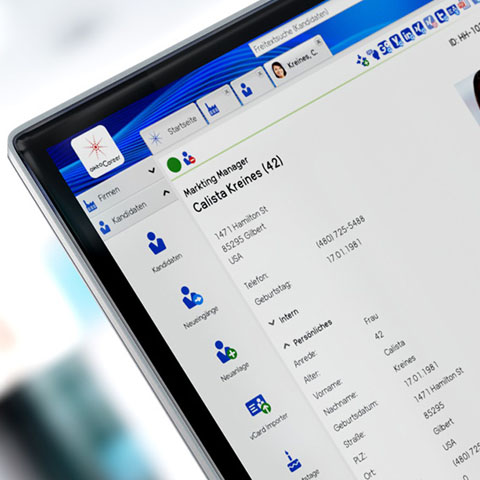

Keep an overview and keep in touch
In the candidate database, profiles for recruitment purposes are captured and made available to identify the right candidate for your client.
Every interaction with the candidate is logged in the database to ensure continuous and optimal support. Thus, you always have access to all relevant information needed for successful job placements, precisely when you need it.
Furthermore, OktoCareer offers the possibility to maintain long-term contact with specific groups of candidates through targeted email campaigns. This enables an effective and sustainable communication strategy, strengthening your relationships with potential candidates and promoting loyalty to your services.
Clients module
- Indication of related companies in the database
- Sales relevant information like client potential and acquisition status
- Direct links to Google Maps, etc.
- Various search options
- Geographic search
- Creation of company lists with contact persons and sorting options
- Sales Lists
- Acquisition Status Overview
- Upload of documents (e.g. assignments, company register information, etc.)
- Documentation of contacts, activities, histories
- Suggested candidates
- Indication of activities that are related to the client
- Sending emails from the system
- Email inbox
- Configurable email templates
- Follow-ups
- Email newsletters
- Bulk emails
- Candidate flash emails
- Outlook integration (and all other email programs)
- Automatic structured storage of incoming customer emails in their file
Customer database
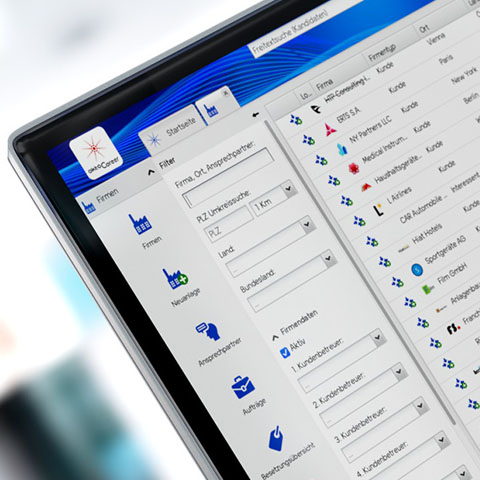

Take care of your customers more efficiently and better
The OktoCareer software for recruitment is your comprehensive solution to establish the perfect connection between candidates and employers. With the ability to customize templates for candidate profiles, you can ensure seamless integration of all relevant information from candidate records.
Our platform provides you with centralized access to all essential communication channels. Details about clients, direct contacts, addresses, ongoing assignments, and proposed candidates are presented clearly and can be accessed with just one click at any time. This enables you to efficiently and effectively address the needs of your clients, optimizing the recruitment process.
Rely on OktoCareer to simplify your processes, improve communication, and ultimately find the best talent for each position.
Assignement module
- Creation of personnel search assignments
- Saving detailed candidate requirements
- Assignment tracking
- Automated import of the candidate requirements in an online job add with the add generator
- Publication of job adds in the company corporate design
- Tracking of order-related costs and expenses
- Tracking of consultants' working hours spent on orders
- Online application function
- Connection to external job sites
- Overview of the candidates that are related to the assignment
Function overview
assignement module
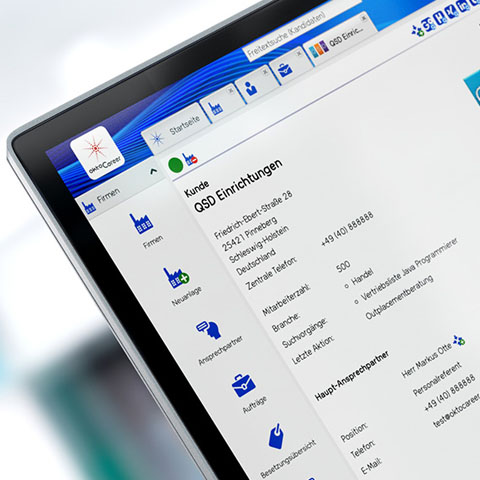

Keep track of your orders
In OktoCareers recruitment software, each new assignment is carefully recorded and assigned to the respective client. This allows for comprehensive tracking of all assignment-related actions, ensuring you are always informed about the current status and history of each assignment.
With the intuitive user interface of our software, you have the ability to view all relevant activities — from guided phone calls to sent emails to proposed candidates — directly in connection with the respective assignment. This ensures seamless documentation and facilitates coordination among different team members.
Additionally, our software provides the functionality to assign assignments to individual processors. Each processor can view the assignments in their individual follow-up list and manage them efficiently. This structured approach optimizes the workflow within your recruitment agency, improving the clarity and time management of your team. Use OktoCareer to professionalize your recruitment processes and maximize the success of your projects.
Sales
- Classification of companies and contact persons
- Search of customers and prospects by different criteria
- Saving of hit lists and search queries
- Sales lists
- Acquisition status
- Restricted user access for employees or assistants who create lists for cold calling
- Serial letter function for newsletters and serial e-mails (limited receipients)
- Assigning consultants to customers
- Follow ups
- Outlook integration (and all other e-mail programs)
- Automatically structured storage of incoming emails from interested parties in their files
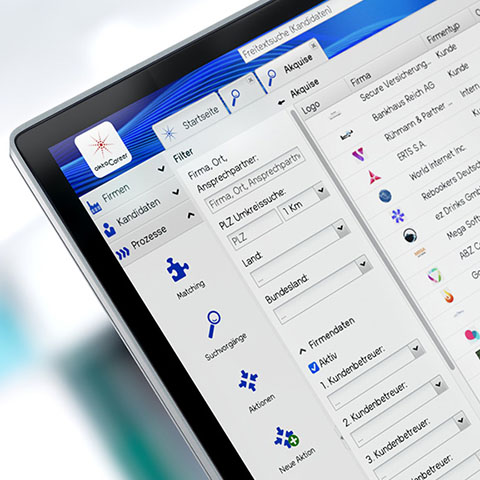

Bundle your sales activities
The OktoCareer software offers a fully integrated Customer Relationship Management (CRM) module specifically designed for the needs of recruiters. This module allows you to effectively communicate with existing clients as well as potential target clients and maintain relationships.
Through the integrated mailing function, you can create and send targeted email campaigns tailored to the specific needs and interests of your clients and target clients.
Another powerful tool within the OktoCareer software is the geographical selection function. This allows you to focus your communication and marketing efforts on specific geographical areas. You can filter potential companies by location, which is particularly useful when regional specifics or local market conditions play a role in recruitment.
In summary, the OktoCareer software not only provides powerful tools for recruitment but also for efficient and targeted customer care and acquisition. Use these features to strengthen your business relationships and further expand your success in recruitment.
Matching
- Name search
- Key word search
- Geographic search
- Structured profile search
- Search by personal criteria
- Search by candidate status
- Consideration of documents (also PDF) in the key word search
- Generation of search result lists
- Sorting and grouping of search results
- Saving of search queries
Function overview
Matching
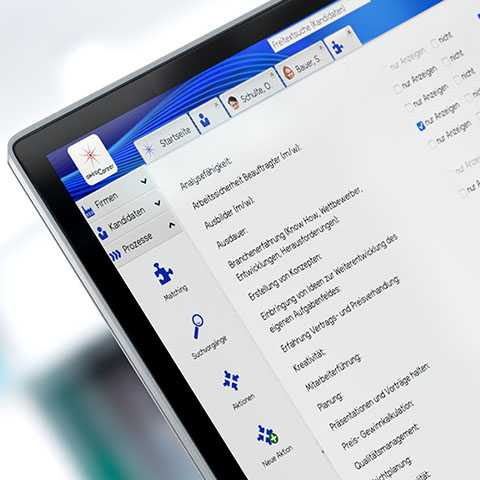

Fill positions with the right candidate
The Matching Module in the OktoCareer software is an essential component to ensure the most efficient and effective placement of candidates. With this module, you can quickly and accurately identify the most suitable candidates from your extensive candidate database and select them for your clients' open positions.
The software offers various search options, from simple free-text search to structured search, allowing you to filter specific criteria and qualifications. These flexible search functions enable you to address the requirements of each position very precisely, maximizing the match between candidate profiles and job requirements.
Furthermore, the module allows for the organization of candidates in clear lists that can be sorted and edited according to various criteria. Candidates can be marked for further processing, simplifying the process of tracking and communication. This not only improves the workflows within your recruitment agency but also enhances the candidate experience by enabling faster and more transparent responses to applicants.
Use the Matching Module of the OktoCareer software to optimize your recruitment processes and significantly increase the success rate of your placements.
Statistic
- Statistics about company actions (offers, orders, cancellations, etc.)
- Statistics job boards

Stay on top of things
The reporting features of the OktoCareer software provide management with a comprehensive and aggregated overview of all ongoing assignments and activities in your recruitment agency. These powerful tools are designed to present decision-relevant information clearly and understandably, enabling executives to make informed decisions.
By using these features, you can analyze important metrics and trends, such as the number of placements, the duration of job placements, the effectiveness of recruiting channels, or the performance of individual consultants. This allows you to identify bottlenecks, optimize processes, and increase the efficiency of the entire recruitment process.
With these comprehensive insights, the OktoCareer software not only supports management in strategic planning but also contributes to the continuous improvement of service quality and customer loyalty. Use the reporting features to take your recruitment agency to the next level and achieve long-term success.
App
- Find the candidates together with your customer in the app.
- Candidate database with contact details.
- Always have your most important contacts with you.
- Overview of the orders with the most important key data.
- Don't lose track of things on the go.
- Company contacts
- Access to your customer data on the go.
Web App for HR consultants
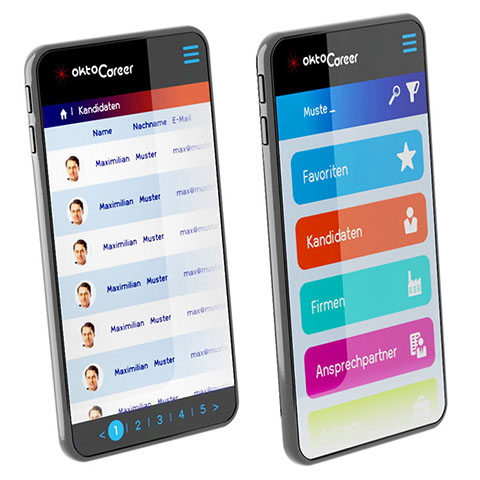
The OktoCareer app for recruitment, available for iPhone and Android, ensures that you always have access to your key contacts no matter where you are. This mobile application is an extension of our comprehensive recruitment software, providing you with the flexibility to access important information anytime, anywhere.
The app is designed to make the user experience seamless and intuitive.
Use the OktoCareer app to ensure that you are always well-informed and organized even on the go. It is the perfect tool for modern recruiters who prefer a dynamic and mobile way of working.

Faq
Can I import existing clients and candidates in the system?
Depending on the data format, we can import the existing master data.
Who will perform the system setup?
We are doing the system setup in cooperation with you. Parts can be done by yourself and other parts are done by us according to your specifications.
How long does the system setup take?
You can start right away, using the questionnaire and e-mail templates, provided by us. Individual configuration is done according to your specifications. After getting familiar with the system, you will be able to do this yourself.
What is the purpose of the questionnaire?
The questionnaire is a central part of the system. It serves for capturing the qualification of the candidates. The questionnaire is configured in the system according to your specifications. The questionnaire should be customized for your candidate target group. This includes contents and the level of detail of the required information. If needed, the questionnaire can branch out according to the answers in order to ask candidates only the relevant questions.
Can you provide a questionnaire?
Yes, we have developed a questionnaire for more than 1000 professional qualifications of different industries. You may use this questionnaire or modify it without extra charge.
Do I have to write the e-mail templates myself?
We will provide more than 50 e-mail templates. You can edit these and add more. In any case you should be able to start your work right away with the existing templates.
Can I run OktoCareer on my own server?
No, OktoCareer is a pure web application. You do not need your own server to use OktoCareer.
How can I get my complete data?
As an administrator, you can download the database yourself any time.
In which countries can I use OktoCareer?
OktoCareer is available in German, English, French, Spanish, Italian, Chinese and Japanese.
Can I connect OktoCareer to the job market on my website?
Yes, applications will run up directly in the OktoCareer system.
Can I extract information from CVS?
Yes, with our CV parsing engine, information is extracted from the CVs and it is stored in the candidate file. This saves manual data entry work.
What is the duration of the contract?
6 months.
Which job-boards can be connected?
Basically, almost all job-boards can be connected to OktoCareer. For the connection, a setup fee will be charged for each job-board.
Can I migrate the data from my old system?
Data from old systems can usually be imported into OktoCareer.
Contact
245 Park Avenue
New York, 10167
USA
Phone: +1 (646) 933 1246
info[at]oktocareer.com
Hotline: +1 (646) 933 1246
Product catalog download